Script Guard
Script Guard is an EximeeBPMS feature that inspects scripts before execution and blocks — or audits — patterns that could lead to remote code execution, data exfiltration, or other security incidents. It works at the engine level, independently of the scripting language in use.
Script Guard applies to all scripts executed by the process engine: Script Tasks, Execution Listeners, Task Listeners, Condition Expressions, and Input/Output Mappings, as well as scripts submitted dynamically via the REST API or Java API.
Enforcement Modes
Script Guard operates in three modes:
| Mode | Behavior |
|---|---|
ENFORCE | Scripts containing forbidden patterns are rejected. A ScriptSecurityException is thrown before the script executes. |
AUDIT | Violations are recorded but execution continues. Use this mode to inspect existing processes before enabling enforcement. |
DISABLED | No checks are performed. Script Guard is inactive. |
The mode is only ever read from static configuration once — the first time the engine starts against a database with no Script Guard configuration stored yet. From then on the database is authoritative, and the mode can only be changed at runtime via the REST API, without restarting the engine — see Configuration for exactly how that works. All engine nodes pick up a REST-driven change within 30 seconds.
Blocked Patterns
The built-in policy checks the script source (case-insensitively) against the following patterns:
| Rule code | Blocked construct | Risk |
|---|---|---|
SCRIPT_SECURITY_LOAD | load( | External script loading |
SCRIPT_SECURITY_CLASS_FOR_NAME | Class.forName( | Dynamic class loading |
SCRIPT_SECURITY_CLASS_LOADER | getClassLoader( | Class loader access |
SCRIPT_SECURITY_REFLECTION | java.lang.reflect. | Reflection API |
SCRIPT_SECURITY_REFLECTION_METHOD | getDeclaredMethod( | Method reflection |
SCRIPT_SECURITY_REFLECTION_FIELD | getDeclaredField( | Field reflection |
SCRIPT_SECURITY_PROCESS_BUILDER | ProcessBuilder | OS process execution |
SCRIPT_SECURITY_RUNTIME | java.lang.Runtime | JVM runtime access |
SCRIPT_SECURITY_RUNTIME_EXEC | Runtime.getRuntime( | OS command execution |
SCRIPT_SECURITY_JAVA_LANG_SYSTEM | java.lang.System | System class access |
SCRIPT_SECURITY_SYSTEM_EXIT | System.exit( | JVM shutdown |
SCRIPT_SECURITY_SYSTEM_GETENV | System.getenv( | Environment variable access |
SCRIPT_SECURITY_SYSTEM_GET_PROPERTY | System.getProperty( | System property access |
SCRIPT_SECURITY_JAVA_IO | java.io.* | File system access |
SCRIPT_SECURITY_JAVA_NIO_FILE | java.nio.file.* | NIO file system access |
SCRIPT_SECURITY_JAVA_NIO_FILE_CHANNEL | NIO file channels | Low-level file I/O |
SCRIPT_SECURITY_JAVA_NIO_NETWORK_CHANNEL | NIO network channels | Network socket access |
SCRIPT_SECURITY_JAVA_NET | java.net.* | Network access |
SCRIPT_SECURITY_URL_CONNECTION | URLConnection | HTTP/URL connections |
SCRIPT_SECURITY_HTTP_CLIENT | HttpClient | HTTP client |
SCRIPT_SECURITY_SOCKET | new Socket( | Raw socket creation |
SCRIPT_SECURITY_SERVER_SOCKET | ServerSocket | Server socket binding |
SCRIPT_SECURITY_NEW_JAVA | new java.* | Generic Java object instantiation |
SCRIPT_SECURITY_GROOVY_SHELL | GroovyShell | Dynamic Groovy execution |
SCRIPT_SECURITY_GROOVY_METACLASS | metaClass | Groovy metaclass manipulation |
SCRIPT_SECURITY_JAVA_TYPE | java.type(, Packages. | Host class lookup (GraalVM JS) |
Configuration
Script Guard’s enforcement mode and allowlist have two representations — keeping them straight matters:
- Static configuration — a Spring Boot property, or a
bpm-platform.xmlproperty on a plain-XML deployment — supplies only the initial value. It is read exactly once: the first time the engine starts against a database that has no Script Guard configuration stored yet (a fresh install, or an upgrade from a version that predates Script Guard). - The database (
ACT_GE_PROPERTY) holds the current, authoritative value from that point on. Every later engine start reads whatever is already stored there and ignores static configuration entirely. The only way to change the mode or allowlist afterward is the REST API —PUT /script-security/config— or a direct write toACT_GE_PROPERTY.
This is deliberate: a production deployment is usually a fleet of engine nodes (multiple Tomcat/Spring Boot instances) sharing one database, and each node’s own application.yml/bpm-platform.xml is local to that node — nothing keeps those files identical or in sync across the fleet. Making the database authoritative after the first boot gives the whole fleet a single, consistent source of truth: a PUT updates one shared row, and every node picks it up on its own cache refresh within 30 seconds — no per-node file edits, no rolling restart, no risk of nodes disagreeing on the mode.
Editing mode/allowlisted-process-definition-keys in application.yml, or scriptSecurityMode/scriptSecurityAllowlistedProcessDefinitionKeys in bpm-platform.xml, and restarting the engine has no effect once a Script Guard configuration row already exists in the database — which, in practice, means every start after the very first one, on a single-node setup too. Use PUT /script-security/config to change the mode or allowlist on a running system.
An unrecognized mode/scriptSecurityMode value (a typo, e.g. ENFORCEE) is not silently treated as ENFORCE — the engine fails to start, on either deployment model, with an error naming the invalid value and the three valid ones (ENFORCE, AUDIT, DISABLED; matching is case-insensitive). Fix the value and restart.
Spring Boot
Configured via Spring Boot application properties under the eximeebpms.bpm.script-security prefix:
eximeebpms:
  bpm:
    script-security:
      mode: ENFORCE
      allowlisted-process-definition-keys:
        - my-trusted-process
        - legacy-migration-process
      violation-store-size: 1000
      retention-days: 30
| Property | Type | Default | Description |
|---|---|---|---|
mode | ENFORCE | AUDIT | DISABLED | ENFORCE | Initial enforcement mode — read once on first start, as described above. Change it afterward via the REST API. |
allowlisted-process-definition-keys | list | empty | Initial allowlist — process definition keys whose scripts skip all security checks, read once on first start. Extend it afterward via the REST API. |
violation-store-size | integer | 1000 | Maximum number of violations kept in the in-memory ring buffer. Older entries are evicted when the limit is reached. |
retention-days | integer | 0 | Number of days to retain violation records in the database. 0 disables automatic cleanup. |
Tomcat / plain XML (bpm-platform.xml)
A deployment that doesn’t use the Spring Boot starter — the Tomcat distribution, or any other container driven by bpm-platform.xml — configures the same initial mode and allowlist as plain process-engine properties, no custom ProcessEnginePlugin required:
<property name="scriptSecurityMode">AUDIT</property>
<property name="scriptSecurityAllowlistedProcessDefinitionKeys">my-trusted-process,legacy-migration-process</property>
<property name="scriptViolationRetentionDays">30</property>
| Property | Type | Default | Description |
|---|---|---|---|
scriptSecurityMode | ENFORCE | AUDIT | DISABLED | ENFORCE | Initial enforcement mode — same one-time-read, database-authoritative-afterward behavior as the Spring Boot mode property above. |
scriptSecurityAllowlistedProcessDefinitionKeys | comma-separated list | empty | Initial allowlist, read once on first start. Extend it afterward via the REST API. |
scriptViolationRetentionDays | integer | 0 | Same as Spring Boot's retention-days — number of days to retain violation records. 0 disables automatic cleanup. Unlike scriptSecurityMode, this is read fresh from the engine configuration at every cleanup run (see below), not database-authoritative — there's no REST endpoint to change it at runtime on either deployment model. |
A Tomcat/plain-XML deployment persists violations to ACT_RU_SCRIPT_VIOLATION, forwards them to the business-event/SIEM outbox, and answers PUT /script-security/config exactly like a Spring Boot deployment — no custom ProcessEnginePlugin needed for any of it. violation-store-size remains a Spring Boot–only YAML property with no equivalent here.
Violation retention/cleanup runs as a single engine-native background job (not a Spring @Scheduled task), so it behaves identically regardless of deployment model: it’s created automatically on first engine start whenever scriptViolationRetentionDays/retention-days is greater than zero, deletes expired rows roughly once a day, and keeps rescheduling itself even while the value is 0 — so raising it later takes effect on the next run, without a restart.
Script Guard stores its runtime configuration and violation records in the database. The ACT_RU_SCRIPT_VIOLATION table is created automatically during the schema migration (Community Edition: shipped in 1.3.0; Enterprise Edition: shipped in 1.2.13-ee).
Allowlisting Process Definitions
Processes that intentionally use constructs blocked by the policy can be placed on an allowlist. Scripts belonging to allowlisted processes skip all security checks.
The allowlist’s initial value can be set statically — in application.yml (Spring Boot) or bpm-platform.xml (Tomcat/plain XML) — see Configuration. From the first engine start onward it lives in the ACT_GE_PROPERTY table and can only be changed via the REST API; static configuration is not consulted again. Updates propagate to all engine nodes within 30 seconds.
Allowlisting disables all Script Guard checks for the listed processes. Prefer enabling AUDIT mode first to identify which patterns are actually used before committing to an allowlist.
Violation Monitoring
Whenever a script triggers a rule — in either ENFORCE or AUDIT mode — Script Guard records a violation event containing:
- Timestamp of the violation
- Process definition key and activity ID of the offending script
- Scripting language (e.g.,
groovy,javascript) - Source type:
INLINE_SOURCE,DYNAMIC_SOURCE,RESOURCE,DYNAMIC_RESOURCE,EXPRESSION, orUNKNOWN - Script origin:
USER,PROCESS_APPLICATION, orPLATFORM - Rule code (e.g.,
SCRIPT_SECURITY_RUNTIME_EXEC) and a human-readable reason
Violations are persisted in the ACT_RU_SCRIPT_VIOLATION table and can be queried via the REST API. The in-memory ring buffer holds up to violation-store-size recent entries; the total count is always available independently.
If the eximeebpms-bpm-monitor extension is used, violations are also exposed as Micrometer meters — see Application Monitoring.
REST API
The Script Guard REST API is available at:
/engine-rest/script-security— for the default engine/engine-rest/engine/{name}/script-security— for a named engine
All endpoints require the ALL permission on the SYSTEM resource (i.e., the eximeebpms-admin role). Requests without this permission receive an HTTP 403 response.
Get Configuration
Returns the current Script Guard configuration — the database-backed value described in Configuration, not the static configuration file.
GET /script-security/config
Response (200 OK):
{
  "mode": "ENFORCE",
  "allowlistedKeys": ["my-trusted-process"]
}
| Field | Type | Description |
|---|---|---|
mode | string | Current enforcement mode: ENFORCE, AUDIT, or DISABLED. |
allowlistedKeys | array<string> | Process definition keys that skip all security checks. |
Update Configuration
Updates the Script Guard configuration at runtime. Changes take effect on all engine nodes within 30 seconds without a restart.
PUT /script-security/config
Request body:
{
  "mode": "AUDIT",
  "allowlistedKeys": ["my-trusted-process", "legacy-migration-process"]
}
| Field | Type | Required | Description |
|---|---|---|---|
mode | string | yes | New enforcement mode: ENFORCE, AUDIT, or DISABLED. |
allowlistedKeys | array<string> | no | Updated allowlist — replaces the existing list entirely. |
Response (200 OK): the updated configuration (same structure as Get Configuration).
List Violations
Returns recent Script Guard violations in descending timestamp order.
GET /script-security/violations
Query parameters:
| Parameter | Type | Default | Description |
|---|---|---|---|
firstResult | integer | 0 | Pagination offset. |
maxResults | integer | 50 | Maximum number of results returned. |
Response (200 OK):
[
  {
    "timestamp": "2026-01-15T10:30:00.000Z",
    "processDefinitionKey": "payment-process",
    "activityId": "scriptTask_1",
    "language": "groovy",
    "sourceType": "INLINE_SOURCE",
    "origin": "PROCESS_APPLICATION",
    "ruleCode": "SCRIPT_SECURITY_RUNTIME_EXEC",
    "reason": "Access to Runtime.getRuntime() is forbidden"
  }
]
| Field | Type | Description |
|---|---|---|
timestamp | string | ISO 8601 timestamp of the violation. |
processDefinitionKey | string | Key of the process definition containing the offending script. |
activityId | string | ID of the BPMN element that triggered the violation. |
language | string | Scripting language (e.g., groovy, javascript). |
sourceType | string | INLINE_SOURCE, DYNAMIC_SOURCE, RESOURCE, DYNAMIC_RESOURCE, EXPRESSION, or UNKNOWN. |
origin | string | USER, PROCESS_APPLICATION, PLATFORM, or UNKNOWN. |
ruleCode | string | Machine-readable rule code that matched (see Blocked Patterns). |
reason | string | Human-readable description of why the script was flagged. |
Get Violation Count
Returns the total number of violations recorded since the engine started.
GET /script-security/violations/count
Response (200 OK):
{
  "count": 42
}
External Validation Module
The same rule set Script Guard enforces inside the engine is also available as a standalone library, with no dependency on the process engine. Add it to a process-design tool, a CI pipeline, or any other pre-deployment tooling to check a script or expression before ever attempting to deploy the process definition that contains it — instead of only finding out from a rejected deployment.
Adding the Dependency
<dependency>
  <groupId>org.eximeebpms.commons</groupId>
  <artifactId>eximeebpms-commons-script-guard-rules</artifactId>
</dependency>
Usage
ScriptSecurityRuleSet ruleSet = DefaultScriptSecurityRuleSet.INSTANCE;
ScriptValidationResult result = ruleSet.validate(scriptSource, ScriptOrigin.USER);

if (!result.isClean()) {
  for (ScriptSecurityRuleMatch match : result.getMatches()) {
    System.out.println(match.ruleCode() + ": " + match.reason());
  }
}
ScriptValidationResult reports rule matches only — it never returns an ENFORCE/AUDIT/DENY outcome. Whether a match actually blocks deployment depends on the target engine instance’s own configured mode, which this module has no way to know. Use it to catch a violation before deploying; the engine’s own enforcement is still authoritative at deploy time.
Rule codes and reasons reported here are identical to the ones in Blocked Patterns and the ones recorded in Violation Monitoring — the engine and this module share one rule set, so the two can never disagree.
Recommended Rollout
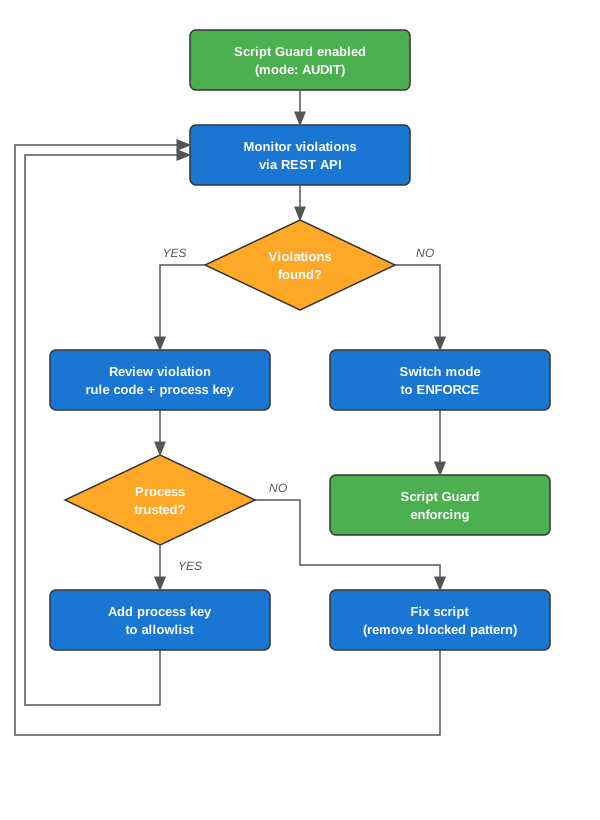
- Audit first — enable Script Guard with mode
AUDIT. Existing processes continue to run but violations are recorded. - Review violations — use the REST API to identify which processes and patterns are flagged.
- Allowlist trusted processes — for processes that intentionally use blocked patterns, add them to the allowlist via the REST API.
- Enforce — switch mode to
ENFORCEonce all violations are resolved or allowlisted.