Database Schema
The database schema of the process engine consists of multiple tables. The table names all start with ACT. The second part is a two-character identification of the use case of the table. This use case will also roughly match the service API.
ACT_RE_*:REstands for repository. Tables with this prefix contain ‘static’ information such as process definitions and process resources (images, rules, etc.).ACT_RU_*:RUstands for runtime. These are the runtime tables that contain the runtime data of process instances, user tasks, variables, jobs, etc. The engine only stores the runtime data during process instance execution and removes the records when a process instance ends. This keeps the runtime tables small and fast.ACT_ID_*:IDstands for identity. These tables contain identity information such as users, groups, etc.ACT_HI_*:HIstands for history. These are the tables that contain historical data such as past process instances, variables, tasks, etc.ACT_GE_*: General data, which is used in various use cases.
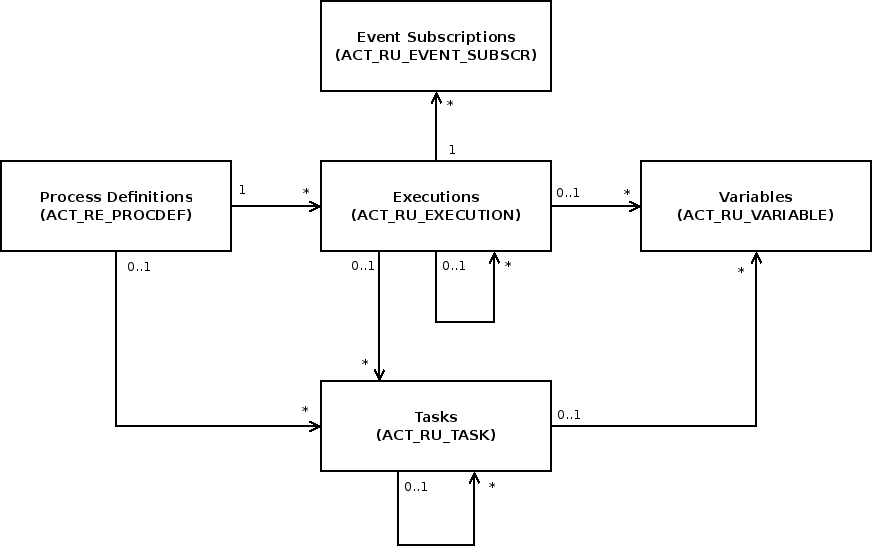
The main tables of the process engines are the entities of process definitions, executions, tasks, variables and event subscriptions. Their relationship is shown in the following UML model.
Process Definitions (ACT_RE_PROCDEF)
The ACT_RE_PROCDEF table contains all deployed process definitions. It
includes information like the version details, the resource name or the
suspension state.
Executions (ACT_RU_EXECUTION)
The ACT_RU_EXECUTION table contains all current executions. It includes
information like the process definition, parent execution, business key, the
current activity and different metadata about the state of the execution.
Tasks (ACT_RU_TASK)
The ACT_RU_TASK table contains all open tasks of all running process
instances. It includes information like the corresponding process instance,
execution and also metadata such as creation time, assignee or due date.
Variables (ACT_RU_VARIABLE)
The ACT_RU_VARIABLE table contains all currently set process or task
variables. It includes the names, types and values of the variables and
information about the corresponding process instance or task.
Event Subscriptions (ACT_RU_EVENT_SUBSCR)
The ACT_RU_EVENT_SUBSCR table contains all currently existing event
subscriptions. It includes the type, name and configuration of the expected
event along with information about the corresponding process instance and
execution.
Schema Log (ACT_GE_SCHEMA_LOG)
The ACT_GE_SCHEMA_LOG table contains a history of the database
schema version. New entries to the table are written when changes to
the database schema are made. On database creation the initial entry
is added. Every update script adds a new entry containing an id,
the version the database was updated to and the date and time
(timestamp) of the update.
To retrieve entries from the schema log, the SchemaLogQuery-API can be used:
List<SchemaLogEntry> entries = managementService.createSchemaLogQuery().list();
Metrics Log (ACT_RU_METER_LOG)
The ACT_RU_METER_LOG table contains a collection of runtime metrics that can help draw conclusions about usage, load
and performance of EximeeBPMS. Metrics are reported as numbers in the Java long range and count the occurrence of
specific events. Please find detailed information about how metrics are collected in the Metrics User Guide.
The default configuration of the MetricsReporter will create one row per metric in ACT_RU_METER_LOG every 15 minutes.
Task Metrics Log (ACT_RU_TASK_METER_LOG)
The ACT_RU_TASK_METER_LOG table contains a collection of task related metrics that can help draw conclusions about usage, load
and performance of the BPM platform. Task metrics contain a pseudonymized and fixed-length value of task assignees and their time of appearance. Please find detailed information about how task metrics are collected in the Metrics User Guide.
Every assignment of a task to an assignee will create one row in ACT_RU_TASK_METER_LOG.
Business Event Outbox (ACT_RU_BUS_EVT_OBX) — Enterprise Edition
The ACT_RU_BUS_EVT_OBX table backs Business Events (Enterprise Edition), available since EximeeBPMS 1.2.16-ee. It implements the transactional outbox pattern: a row is inserted in the same transaction as the business change it describes, and a background dispatcher later reads undelivered rows and hands them to the configured publisher. The table is generic across all business event types — adding a new event type (e.g. the job, batch, incident, external task, activity instance, DMN decision, form property, and user operation log events added in 1.3.1-ee) does not require a schema change, since the event payload itself is stored as an opaque JSON string.
| Column | Type | Description |
|---|---|---|
ID_ | bigint | Primary key, auto-generated. |
CREATED_DATE_ | timestamp | When the row was written — i.e. when the underlying business change committed, not when it was dispatched. |
BUSINESS_EVENT_ | clob | The business event's payload, serialized to JSON. See the Business Event Field Reference for the fields behind each event type. |
EVENT_TYPE_ | varchar(255) | The fully-qualified event type, e.g. bpms:task-instance:complete — matches businessEventType inside the payload. |
PROC_INST_ID_ | varchar(64) | Process instance id, when the event has a process context; otherwise NULL. |
ROOT_PROC_INST_ID_ | varchar(64) | Root process instance id (top of the call-activity chain), when applicable. |
PROC_DEF_KEY_ | varchar(255) | Process definition key, when the event has a process context. |
TASK_ID_ | varchar(64) | Task id, when the event is scoped to a task. |
PROCESSED_ | boolean | Whether the dispatcher has successfully delivered this row to the configured publisher. Defaults to false. |
PROCESSED_DATE_ | timestamp | When the row was marked delivered; NULL until then. |
There is no foreign key relationship from ACT_RU_BUS_EVT_OBX to the core runtime tables — by design, the outbox must survive the deletion of the process instance or task it describes. Delivered rows are removed automatically past their retention period; see Business Events — Configuration.
Script Violation Log (ACT_RU_SCRIPT_VIOLATION)
The ACT_RU_SCRIPT_VIOLATION table stores violation events recorded by Script Guard. A row is inserted each time a script triggers a security rule while Script Guard is in ENFORCE or AUDIT mode. This table is available from EximeeBPMS 1.3.0.
| Column | Type | Description |
|---|---|---|
ID_ | varchar(64) | Primary key. |
TIMESTAMP_ | timestamp | Time at which the violation was detected. |
PROC_DEF_KEY_ | varchar(255) | Key of the process definition containing the offending script. |
ACTIVITY_ID_ | varchar(255) | ID of the BPMN element (e.g., Script Task) that triggered the violation. |
LANGUAGE_ | varchar(64) | Scripting language (e.g., groovy, javascript). |
SOURCE_TYPE_ | varchar(64) | Origin of the script source: INLINE_SOURCE, DYNAMIC_SOURCE, RESOURCE, DYNAMIC_RESOURCE, EXPRESSION, or UNKNOWN. |
ORIGIN_ | varchar(64) | Who submitted the script: USER, PROCESS_APPLICATION, PLATFORM, or UNKNOWN. |
RULE_CODE_ | varchar(255) | Machine-readable rule code that matched (e.g., SCRIPT_SECURITY_RUNTIME_EXEC). |
REASON_ | varchar(1000) | Human-readable explanation of why the script was flagged. |
Older records can be purged automatically by setting retention-days in the Script Guard configuration.
Entity Relationship Diagrams
The database is not part of the public API. The database schema may change for MINOR and MAJOR version updates.
Please note: The following diagrams are based on the MySQL database schema. For other databases the diagram may be slightly different.
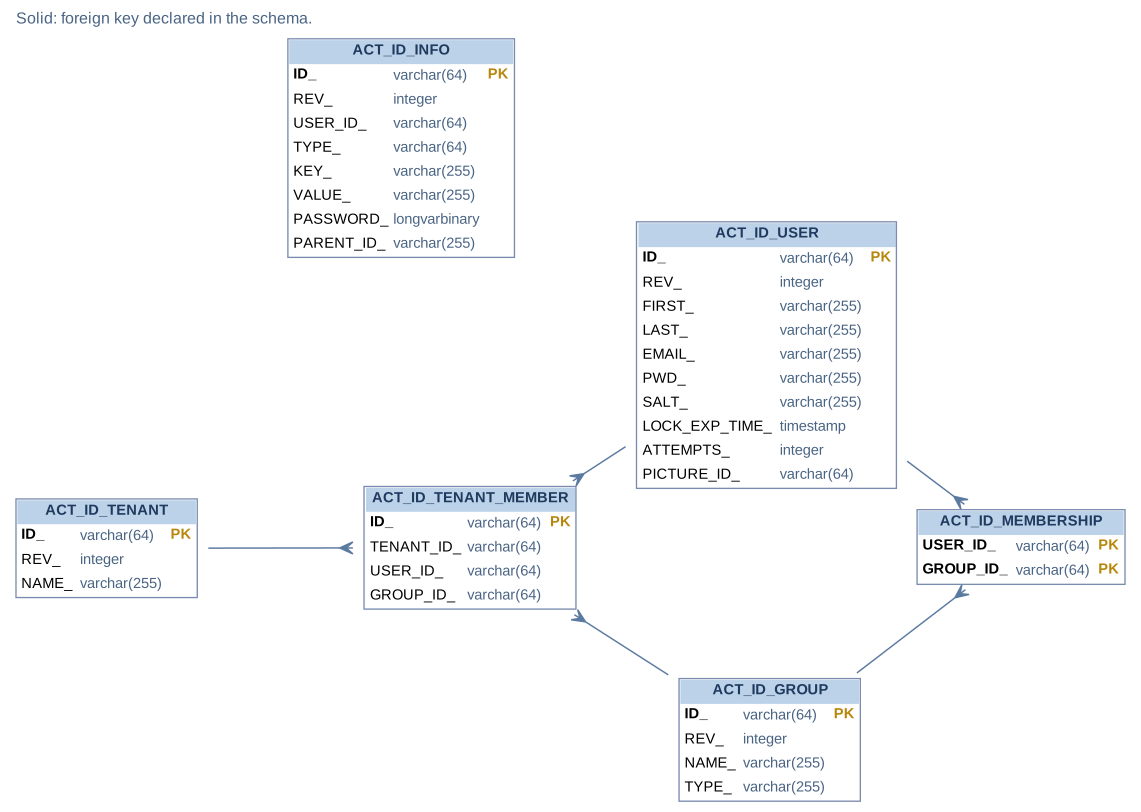
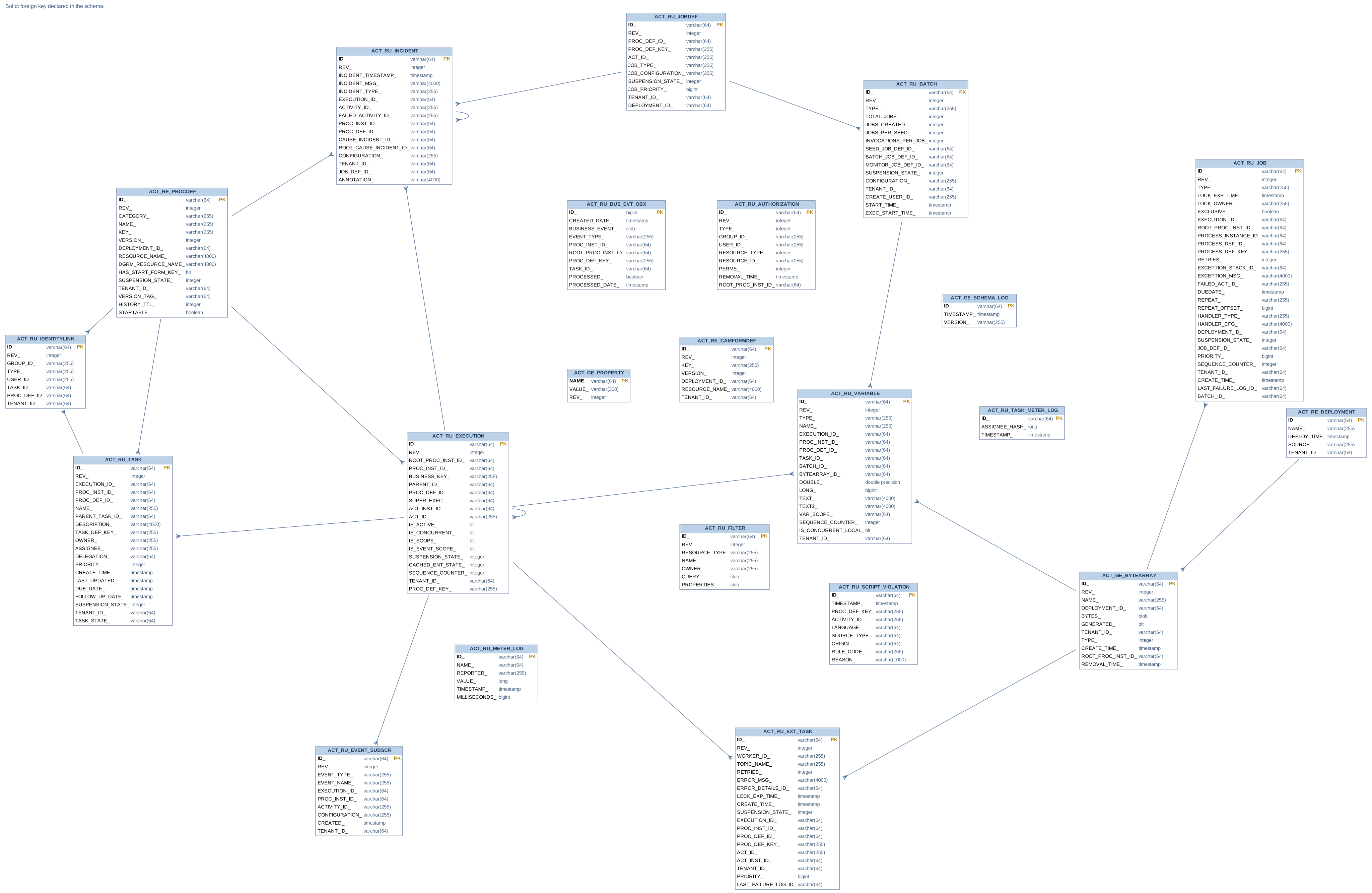
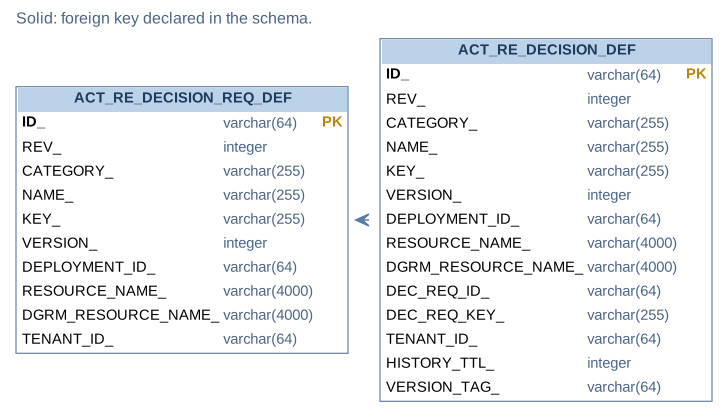
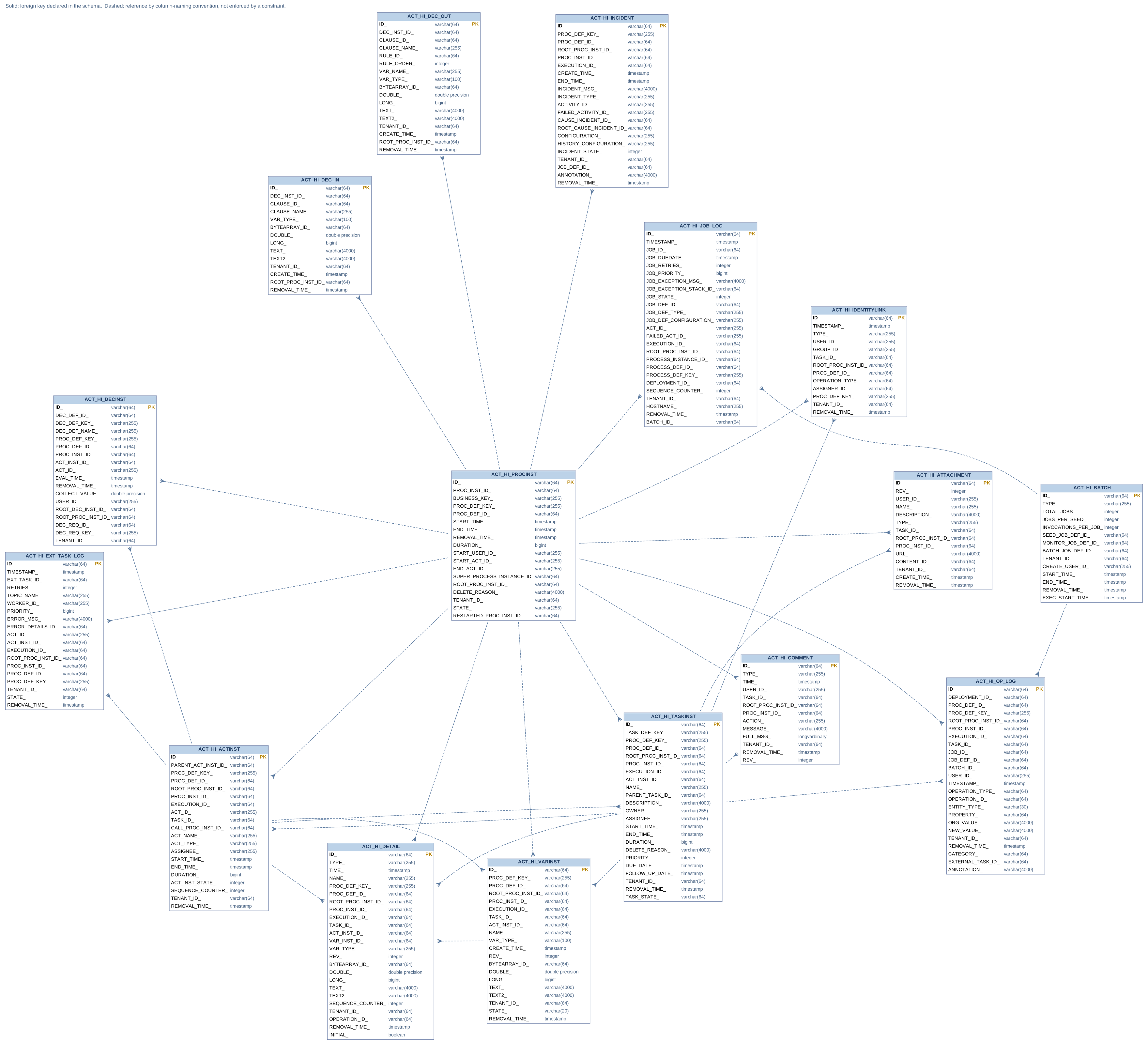
The following Entity Relationship Diagrams visualize the database tables and their explicit foreign key constraints, grouped by Engine with focus on BPMN, Engine with focus on DMN, the Engine History and the Identity. Please note that the diagrams do not visualize implicit connections between the tables.
The Community and Enterprise editions declare the same schema, so one set of diagrams covers both. Separate Enterprise Edition diagrams were published until 1.4.0, when business events moved into the Community Edition and the last difference between the two disappeared.
These diagrams are generated from the engine’s own schema definition rather than drawn by hand, so they describe the tables and foreign keys a release actually creates.
Engine BPMN
Engine DMN
History
To allow different configurations and to keep the tables more flexible, the history tables contain no foreign key constraints. The relationships shown there are the ones the column names imply — PROC_INST_ID_, TASK_ID_ and the like — drawn as dashed lines to make clear that the database does not enforce them.
Identity