External Task Client
The EximeeBPMS External Task Client allows you to set up remote service tasks for your workflow. There is a supported Java as well as JavaScript implementation.
For metrics on external tasks served to this client (created, ended, currently open, currently failing), see Application Monitoring.
Features
- Complete External Tasks
- Extend the lock duration of External Tasks
- Unlock External Tasks
- Report BPMN errors and failures
- Share variables with the Workflow Engine
Bootstrapping the Client
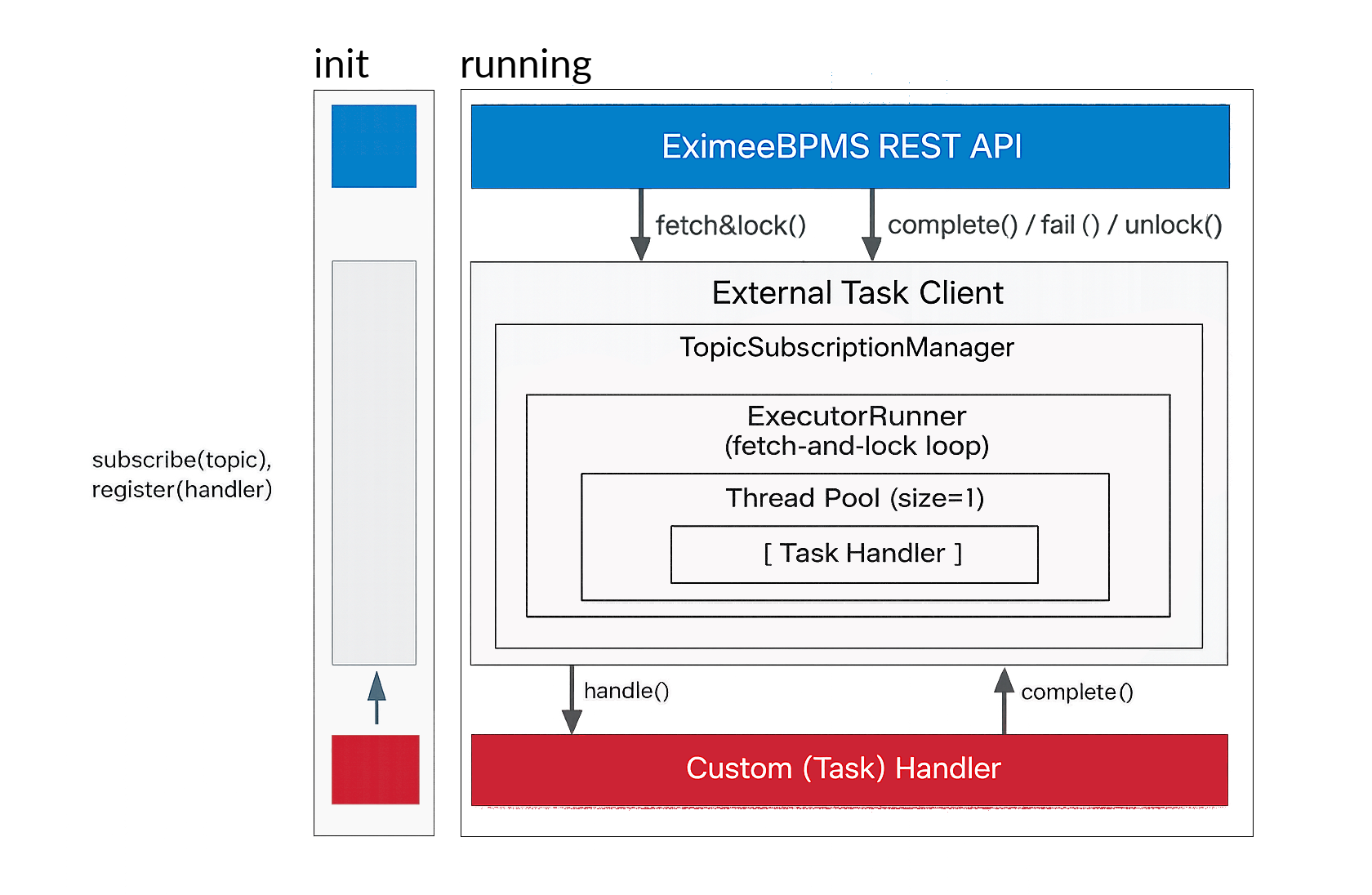
The client allows to handle service tasks of type “external”. In order to configure and instantiate the client, all supported implementations offer a convenient interface. The communication between the client and the EximeeBPMS Workflow Engine is HTTP. Hence, the respective URL of the REST API is a mandatory information.
Request Interceptors
To add additional HTTP headers to the performed REST API requests, the request interceptor method can be used. This becomes necessary, in the context of e.g. authentication.
Basic Authentication
In some cases it is necessary to secure the REST API of the EximeeBPMS Workflow Engine via Basic Authentication. For such situations a Basic Authentication implementation is provided by the client. Once configured with user credentials, the basic authentication header is added to each REST API request.
Custom Interceptor
Custom interceptors can be added while bootstrapping the client. For more details regarding the implementation please check the documentation related to the client of interest.
Topic Subscription
If a Service Task of the type “External” is placed inside a workflow, a topic name must be specified. The corresponding BPMN 2.0 XML could look as follows:
...
<serviceTask id="checkCreditScoreTask"
  name="Check credit score"
  eximeebpms:type="external"
  eximeebpms:topic="creditScoreChecker" />
...
As soon as the Workflow Engine reached an External Task in a BPMN process, a corresponding activity instance is created, which is waiting to be fetched and locked by a client.
The client subscribes to the topic and fetches continuously for newly appearing External Tasks provided by the Workflow Engine. Each fetched External Task is marked with a temporary lock. Like this, no other clients can work on this certain External Task in the meanwhile. A lock is valid for the specified period of time and can be extended.
When setting up a new topic subscription, it is mandatory to specify the topic name and a handler function. Once a topic has been subscribed, the client can start receiving work items by polling the process engine’s API.
Handler
Handlers can be used to implement custom methods which are invoked whenever an External Task is fetched and locked successfully. For each topic subscription an External Task handler interface is provided.
The handlers are invoked sequentially for each fetched-and-locked external task.
Concurrent Task Execution
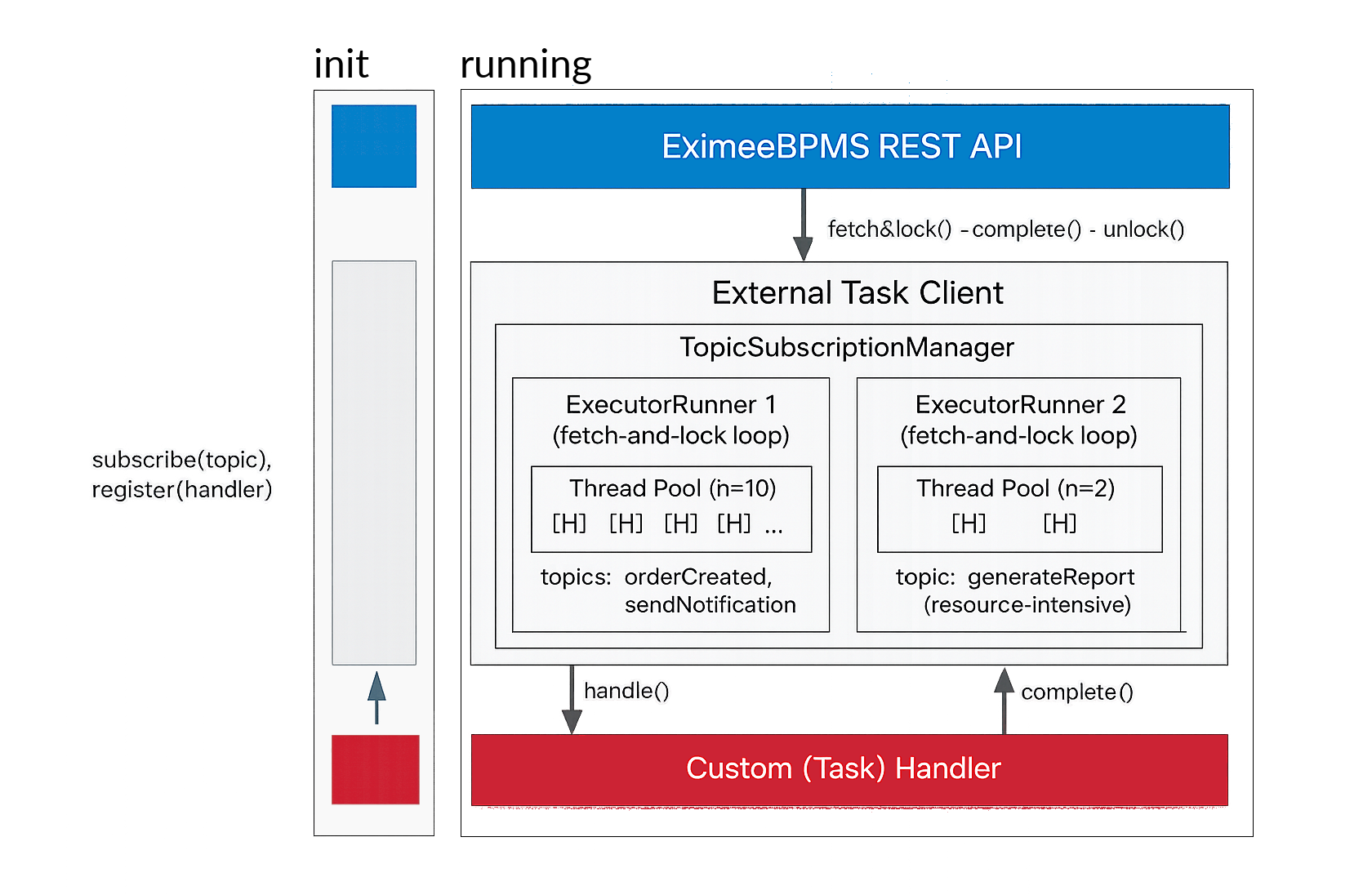
By default the client uses a single worker thread — tasks are processed one at a time. To enable parallel execution, configure the thread pool size on the builder:
ExternalTaskClient client = ExternalTaskClient.create()
  .baseUrl("http://localhost:8080/engine-rest")
  .threadPoolSize(10)
  .build();
The number of tasks fetched per acquisition cycle is automatically bounded by floor(threadPoolSize * maxFetchedTasksMultiplier) - tasksInProgress. The maxFetchedTasksMultiplier (default 1.0) controls how many extra tasks can be pre-loaded in the queue while all threads are busy:
ExternalTaskClient client = ExternalTaskClient.create()
  .baseUrl("http://localhost:8080/engine-rest")
  .threadPoolSize(10)
  .maxFetchedTasksMultiplier(1.5)  // up to 15 tasks fetched; 10 running + 5 queued
  .build();
Per-handler dedicated thread pool
Different topic subscriptions can run on separate, independently-sized thread pools. Implement ExternalTaskHandlerWithSpecificExecutor and return a dedicated ThreadPoolExecutor from getThreadPoolExecutor():
ThreadPoolExecutor heavyExecutor = new ThreadPoolExecutor(
    2, 4, 60L, TimeUnit.SECONDS, new LinkedBlockingQueue<>());

client.subscribe("heavyTopic")
    .handler(new ExternalTaskHandlerWithSpecificExecutor() {
        @Override
        public void execute(ExternalTask task, ExternalTaskService service) {
            // handle resource-intensive task
        }
        @Override
        public ThreadPoolExecutor getThreadPoolExecutor() {
            return heavyExecutor;
        }
    })
    .open();
Each distinct ThreadPoolExecutor instance gets its own independent fetch-and-lock loop. Two handlers that return the same executor instance share one loop and one thread pool. This lets you isolate slow or resource-intensive topics without starving fast ones.
Completing Tasks
Once the custom methods specified in the handler are completed, the External Task can be completed. This means for the Workflow Engine that the execution will
move on. For this purpose, all supported implementations have a complete method which can be called within the handler function. However, the
External Task can only be completed, if it is currently locked by the client.
Extending the Lock Duration of Tasks
Sometimes the completion of custom methods takes longer than expected. In this case the lock duration needs to be extended.
This action can be performed by calling an extendLock method passing the new lock duration.
The lock duration can only be extended, if the External Task is currently locked by the client.
Unlocking Tasks
If an External Task is supposed to be unlocked so that other clients are allowed to fetch and lock this task again,
an unlock method can be called. The External Task can only be unlocked, if the task is currently locked by the client.
Graceful Shutdown
When the client is stopped by calling stop(), tasks that have already been fetched from the engine but have not yet started executing (i.e. they are waiting in the thread pool queue) are automatically unlocked in the engine. This prevents tasks from remaining locked until the lock expiry time after an application restart, which would otherwise delay processing by other clients.
The behavior is automatic — no additional configuration is required.
ExternalTaskClient client = ExternalTaskClient.create()
  .baseUrl("http://localhost:8080/engine-rest")
  .build();

// ... subscribe to topics ...

// On application shutdown:
client.stop();
What happens during stop()
- The fetch-and-lock acquisition loop stops — no new tasks are fetched.
- Tasks already executing in the thread pool are not interrupted — they are allowed to finish.
- Tasks that were fetched and placed in the queue but not yet started are sent an unlock request to the engine, making them immediately available to other clients.
Note: If the client terminates unexpectedly (process crash, kill signal) without calling stop(), queued tasks remain locked until the lock duration expires. A shorter lockDuration reduces this window.
Reporting Failures
If the client faces a problem that makes it impossible to complete the External Task successfully, this problem can be reported to the Workflow Engine. A failure can only be reported, if the External Task is currently locked by the client. You can find a detailed documentation about this action in the EximeeBPMS User Guide.
Reporting BPMN Errors
Error boundary events are triggered by BPMN errors. A BPMN error can only be reported, if the External Task is currently locked by the client. You can find a detailed documentation about this action in the EximeeBPMS User Guide.
Variables
Both external tasks clients are compatible with all data types the EximeeBPMS Engine supports. Variables can be accessed/altered using typed or the untyped API.
Process and Local Variables
Variables can be treated as process or local variables. The former is set on the highest possible hierarchy of the variable scope and available to its child scopes in the entire process. If a variable, in contrast, is supposed to be set exactly on the provided execution scope, the local type can be used.
Note: setting variables does not make sure that variables are persisted. Variables which were set locally on client-side are only available during runtime and get lost if they are not shared with the Workflow Engine by successfully completing the External Task of the current lock.
Untyped Variables
Untyped variables are stored by using the respective type of their values. It is possible to store/retrieve only a single variable or multiple variables at once.
Typed Variables
Setting typed variables requires the type to be specified explicitly. Typed variables can also be retrieved, the received object provides a variety of information besides type and value. Of course it is also possible to set and get multiple typed variables.
Example: Using Typed JSON, XML and Object variables
// obtained via subscription
ExternalTaskService externalTaskService = ..;
ExternalTask externalTask = ..;

VariableMap variables = Variables.createVariables();

JsonValue jsonCustomer = externalTask.getVariableTyped("customer");
// deserialize jsonCustomer.getValue() to customer object
// and modify ...
variables.put("customer", ClientValues.jsonValue(customerJsonString));

XmlValue xmlContract = externalTask.getvariableTyped("contract");
// deserialize xmlContract.getValue() to contract object
// and modify ...
variables.put("contract", ClientValues.xmlValue(contractXmlString));

TypedValue typedInvoice = externalTask.getVariableTyped("invoice");
Invoice invoice = (Invoice) typedInvoice.getValue();
// modify invoice object
variables.put("invoice", ClientValue.objectValue(invoice)
    .serializationDataFormat("application/xml").create();

externalTaskService.complete(externalTask, variables);
Logging
The client implementations support logging various events in the client lifecycle. Hence situations like the following can be reported:
- External Tasks could not be fetched and locked successfully
- An exception occurred…
- while invoking a handler
- while deserializing variables
- while invoking a request interceptor
- …
For more details, please check the documentation related to the client of interest.
Task Execution Statistics
The Java External Task Client collects in-memory execution statistics for each combination of process definition key and topic name. The following metrics are tracked within each 5-minute reporting window:
| Metric | Description |
|---|---|
count | Number of tasks completed in the current window |
totalTimeMs | Sum of all execution times (ms) |
minTimeMs | Shortest single execution (ms) |
maxTimeMs | Longest single execution (ms) |
averageTimeMs | totalTimeMs / count |
Statistics are reset after each reporting cycle, so every report contains only the delta since the previous one.
Built-in file logging
To enable periodic logging of statistics to the application log every 5 minutes:
ExternalTaskClient client = ExternalTaskClient.create()
  .baseUrl("http://localhost:8080/engine-rest")
  .statsSchedulerEnabled(true)
  .build();
This is disabled by default to avoid unnecessary I/O overhead in high-throughput deployments. Statistics are always collected in-memory regardless of this setting.
Accessing statistics programmatically
The current statistics can be read at any time from the running client:
ExternalTaskExecutionStats stats = client.getExecutionStats();

// Access stats for a specific topic
TaskStats topicStats = stats.getStats("myProcessDefinitionKey", "myTopic");
if (topicStats != null) {
  System.out.println("Count:   " + topicStats.getCount());
  System.out.println("Min:     " + topicStats.getMinTimeMs() + " ms");
  System.out.println("Max:     " + topicStats.getMaxTimeMs() + " ms");
  System.out.println("Average: " + topicStats.getAverageTimeMs() + " ms");
}

// Access all topics at once
Map<String, TaskStats> allStats = stats.getAllStats();
Custom listeners (SPI)
For integration with external monitoring systems, implement the ExternalTaskExecutionStatsListener SPI and register it on the builder. The listener is invoked every 5 minutes on a dedicated daemon thread.
public class MyMetricsListener implements ExternalTaskExecutionStatsListener {

  @Override
  public void onStats(Map<String, TaskStats> statsSnapshot) {
    statsSnapshot.forEach((key, stats) -> {
      System.out.printf("[%s] count=%d avg=%.1f ms max=%d ms%n",
          key,
          stats.getCount(),
          stats.getAverageTimeMs(),
          stats.getMaxTimeMs());
    });
  }
}
ExternalTaskClient client = ExternalTaskClient.create()
  .baseUrl("http://localhost:8080/engine-rest")
  .addStatsListener(new MyMetricsListener())
  .build();
Multiple listeners can be registered by calling addStatsListener multiple times. The statsSchedulerEnabled flag (file logging) and registered listeners are independent — you can use one, the other, or both.
Note: The TaskStats objects passed to onStats are stable snapshots — they are detached from the internal statistics map before any listener is called (via an atomic swap). Subsequent task executions are recorded into new objects, so the values in the snapshot will not change after onStats returns. It is safe to store TaskStats references and read them later.
Micrometer / Prometheus integration
The following example exports statistics to Prometheus via Micrometer. It registers a Counter for the number of executions and Gauge meters for the average and maximum execution duration per topic:
public class MicrometerStatsListener implements ExternalTaskExecutionStatsListener {

  private final MeterRegistry meterRegistry;
  private final ConcurrentHashMap<String, PerTopicMeters> metersCache = new ConcurrentHashMap<>();

  public MicrometerStatsListener(MeterRegistry meterRegistry) {
    this.meterRegistry = meterRegistry;
  }

  @Override
  public void onStats(Map<String, TaskStats> statsSnapshot) {
    statsSnapshot.forEach((key, stats) ->
        metersCache.computeIfAbsent(key, k -> registerMeters(stats)).update(stats));
  }

  private PerTopicMeters registerMeters(TaskStats stats) {
    Tags tags = Tags.of(
        "process.definition.key", stats.getProcessDefinitionKey(),
        "topic.name",             stats.getTopicName());

    Counter counter = Counter.builder("eximeebpms.external.tasks.client.execution.count")
        .description("Number of external task executions processed by the client")
        .tags(tags)
        .register(meterRegistry);

    AtomicLong avgMs = new AtomicLong(0);
    AtomicLong maxMs = new AtomicLong(0);

    Gauge.builder("eximeebpms.external.tasks.client.execution.duration.avg.ms", avgMs, AtomicLong::get)
        .description("Average execution duration of external tasks in the last reporting interval (ms)")
        .tags(tags)
        .register(meterRegistry);

    Gauge.builder("eximeebpms.external.tasks.client.execution.duration.max.ms", maxMs, AtomicLong::get)
        .description("Maximum execution duration of external tasks in the last reporting interval (ms)")
        .tags(tags)
        .register(meterRegistry);

    return new PerTopicMeters(counter, avgMs, maxMs);
  }

  record PerTopicMeters(Counter counter, AtomicLong avgMs, AtomicLong maxMs) {
    void update(TaskStats stats) {
      if (stats.getCount() > 0) {
        counter.increment(stats.getCount());
        avgMs.set(Math.round(stats.getAverageTimeMs()));
        maxMs.set(stats.getMaxTimeMs());
      }
    }
  }
}
Register the listener when building the client:
ExternalTaskClient client = ExternalTaskClient.create()
  .baseUrl("http://localhost:8080/engine-rest")
  .addStatsListener(new MicrometerStatsListener(meterRegistry))
  .build();
The following meters are available in Prometheus at /actuator/prometheus:
| Metric | Type | Description |
|---|---|---|
eximeebpms_external_tasks_client_execution_count_total | Counter | Total executions per topic (cumulative) |
eximeebpms_external_tasks_client_execution_duration_avg_ms | Gauge | Average duration in the last 5-minute window |
eximeebpms_external_tasks_client_execution_duration_max_ms | Gauge | Maximum duration in the last 5-minute window |
All meters carry the labels process_definition_key and topic_name.
Note: The counter increments by the number of tasks completed in the interval (not 1 per interval). The gauges reflect last-interval values; they do not accumulate across windows.
Accessing the internal Apache HttpClientBuilder
If there is a need to even further customize the communication of the client, you can get access to
the Apache HttpClientBuilder using the ExternalTaskClientBuilder
’s customizeHttpClient method.
The method accepts a Consumer as parameter that gives you access to the internal Apache HttpClientBuilder:
ExternalTaskClient.create()
  .baseUrl("localhost")
  .customizeHttpClient((HttpClientBuilder httpClientBuilder) ->
    httpClientBuilder.setDefaultRequestConfig(RequestConfig.custom()
      .setResponseTimeout(Timeout.ofSeconds(30))
      .build()))
  .build();
Examples
Complete examples of how to set up the different External Task Clients can be found on GitHub (Java, JavaScript).
External task throughput
For a high throughput of external tasks, balance the number of external task instances, the number of clients, and the duration of handling each task.
The Java client supports parallel task execution via a configurable thread pool (see Concurrent Task Execution). Increase threadPoolSize to process more tasks simultaneously within a single client instance. For isolation between task types, use ExternalTaskHandlerWithSpecificExecutor to assign dedicated thread pools per topic.
For long-running tasks (more than 30 seconds), consider fetching tasks one at a time (maxTasks = 1) and adjusting the Long Polling interval to your needs (e.g. asyncResponseTimeout = 60000 ms).
The Java client supports exponential backoff with a default initial delay of 500 ms, factor 2, and a maximum of 60 000 ms. These values can be tuned via ExponentialBackoffStrategy.