
External Task Client
The EximeeBPMS External Task Client allows you to set up remote service tasks for your workflow. There is a supported Java as well as JavaScript implementation.
Features
- Complete External Tasks
- Extend the lock duration of External Tasks
- Unlock External Tasks
- Report BPMN errors and failures
- Share variables with the Workflow Engine
Bootstrapping the Client
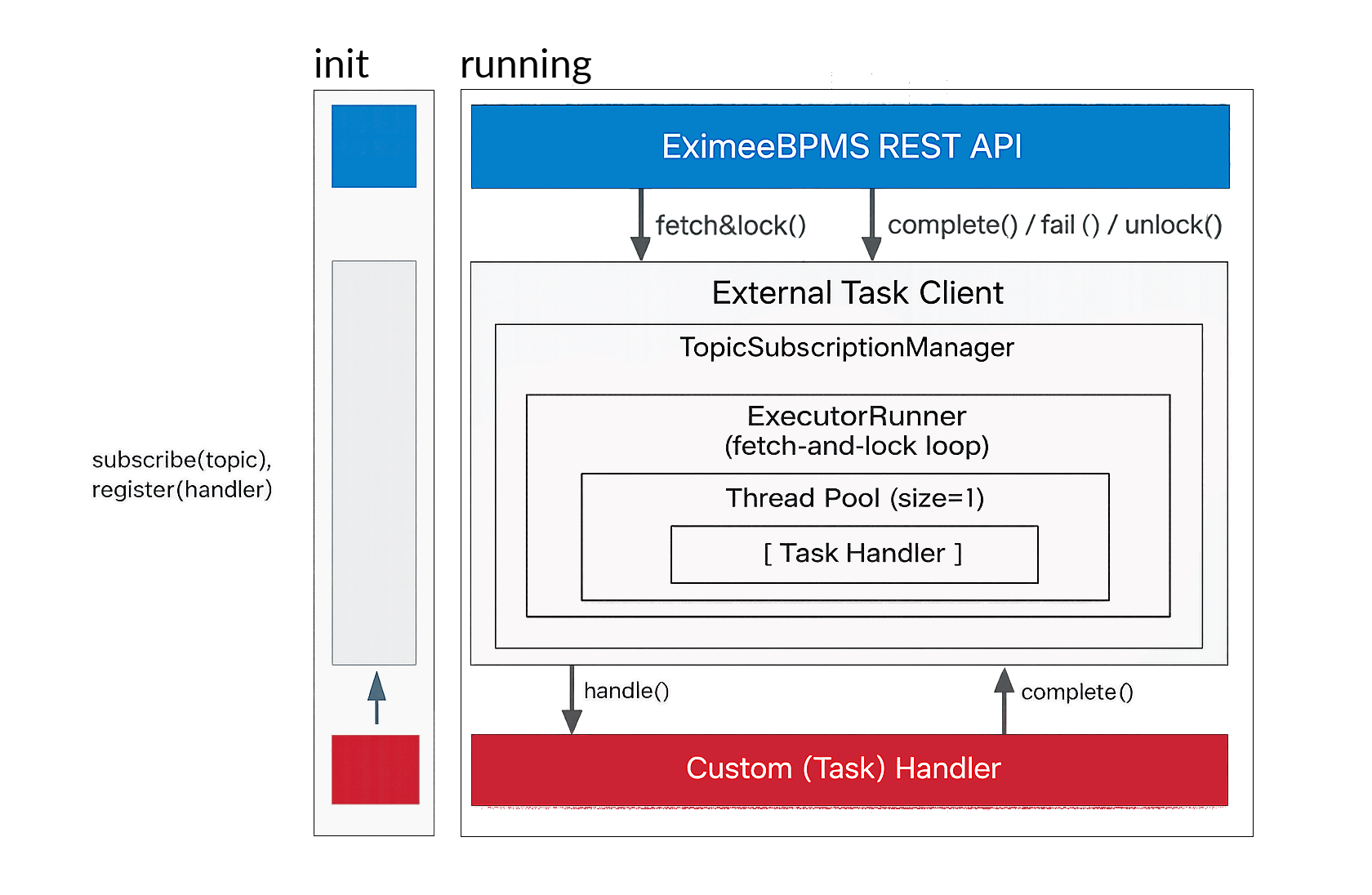
The client allows to handle service tasks of type “external”. In order to configure and instantiate the client, all supported implementations offer a convenient interface. The communication between the client and the EximeeBPMS Workflow Engine is HTTP. Hence, the respective URL of the REST API is a mandatory information.
Request Interceptors
To add additional HTTP headers to the performed REST API requests, the request interceptor method can be used. This becomes necessary, in the context of e.g. authentication.
Basic Authentication
In some cases it is necessary to secure the REST API of the EximeeBPMS Workflow Engine via Basic Authentication. For such situations a Basic Authentication implementation is provided by the client. Once configured with user credentials, the basic authentication header is added to each REST API request.
Custom Interceptor
Custom interceptors can be added while bootstrapping the client. For more details regarding the implementation please check the documentation related to the client of interest.
Topic Subscription
If a Service Task of the type “External” is placed inside a workflow, a topic name must be specified. The corresponding BPMN 2.0 XML could look as follows:
...
<serviceTask id="checkCreditScoreTask"
  name="Check credit score"
  eximeebpms:type="external"
  eximeebpms:topic="creditScoreChecker" />
...
As soon as the Workflow Engine reached an External Task in a BPMN process, a corresponding activity instance is created, which is waiting to be fetched and locked by a client.
The client subscribes to the topic and fetches continuously for newly appearing External Tasks provided by the Workflow Engine. Each fetched External Task is marked with a temporary lock. Like this, no other clients can work on this certain External Task in the meanwhile. A lock is valid for the specified period of time and can be extended.
When setting up a new topic subscription, it is mandatory to specify the topic name and a handler function. Once a topic has been subscribed, the client can start receiving work items by polling the process engine’s API.
Handler
Handlers can be used to implement custom methods which are invoked whenever an External Task is fetched and locked successfully. For each topic subscription an External Task handler interface is provided.
The handlers are invoked sequentially for each fetched-and-locked external task.
Concurrent Task Execution
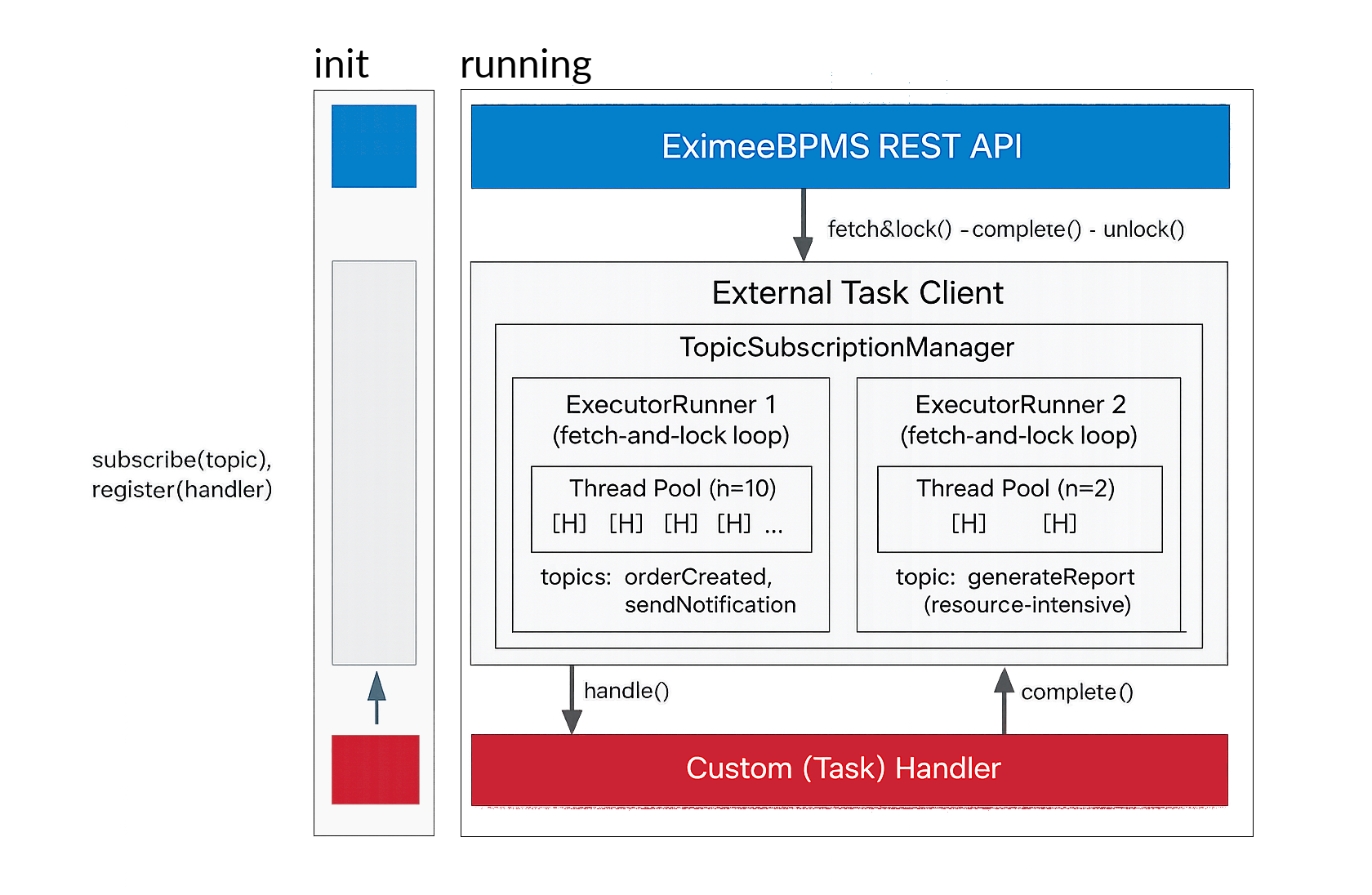
By default the client uses a single worker thread — tasks are processed one at a time. To enable parallel execution, configure the thread pool size on the builder:
ExternalTaskClient client = ExternalTaskClient.create()
  .baseUrl("http://localhost:8080/engine-rest")
  .threadPoolSize(10)
  .build();
The number of tasks fetched per acquisition cycle is automatically bounded by floor(threadPoolSize * maxFetchedTasksMultiplier) - tasksInProgress. The maxFetchedTasksMultiplier (default 1.0) controls how many extra tasks can be pre-loaded in the queue while all threads are busy:
ExternalTaskClient client = ExternalTaskClient.create()
  .baseUrl("http://localhost:8080/engine-rest")
  .threadPoolSize(10)
  .maxFetchedTasksMultiplier(1.5)  // up to 15 tasks fetched; 10 running + 5 queued
  .build();
Locks of queued tasks
The engine locks a task when it is fetched, also when the task then waits in the queue for a thread. So that the waiting does not use up the lock, a handler starts with at least 90 % of its lock duration:
- While a task waits, the client renews its lock each time half of it has elapsed (with a
maxFetchedTasksMultiplierabove 1), on up to 4 threads per thread pool, each renewal waiting for the engine at most half of the lock that is left. - When a task that waited starts with less than 90 % of its lock left, the client renews the lock before calling the handler, which costs one more request per such task. If that renewal fails for another reason than a lost lock (the engine cannot be reached, or an error from a proxy or rate limiter), the handler runs with the lock that is left.
- If the thread pool finishes no task within a waiting task’s lock duration, its threads are stuck or all busy longer than the lock. The client then stops renewing and unlocks the waiting task, so that other workers can take it.
- If the engine refuses a renewal because the lock has expired or another worker has taken the task meanwhile, or because the task no longer exists, the task is not executed. Other errors, for example from a proxy or a rate limiter in between, are retried.
The client measures lock deadlines on its own monotonic clock, from the moment the tasks were fetched, so neither a clock difference between client and engine nor a change of the system time matters. A renewal or unlock that fails, and a task given up because of it, is logged as a warning (a failed unlock as an error); a task whose lock had already expired when a thread became free is skipped and logged at info level.
Per-handler dedicated thread pool
Different topic subscriptions can run on separate, independently-sized thread pools. Implement ExternalTaskHandlerWithSpecificExecutor and return a dedicated ThreadPoolExecutor from getThreadPoolExecutor():
ThreadPoolExecutor heavyExecutor = new ThreadPoolExecutor(
    2, 4, 60L, TimeUnit.SECONDS, new LinkedBlockingQueue<>());

client.subscribe("heavyTopic")
    .handler(new ExternalTaskHandlerWithSpecificExecutor() {
        @Override
        public void execute(ExternalTask task, ExternalTaskService service) {
            // handle resource-intensive task
        }
        @Override
        public ThreadPoolExecutor getThreadPoolExecutor() {
            return heavyExecutor;
        }
    })
    .open();
Each distinct ThreadPoolExecutor instance gets its own independent fetch-and-lock loop. Two handlers that return the same executor instance share one loop and one thread pool. This lets you isolate slow or resource-intensive topics without starving fast ones.
Connections to the engine
With long polling (asyncResponseTimeout), every fetch-and-lock loop holds one connection to the engine for the whole poll, and the worker threads need connections of their own to complete tasks, report failures and extend locks. The client therefore sizes its connection pool itself: one connection per fetch-and-lock loop plus one per core thread of the loop’s thread pool, one per thread renewing the locks of queued tasks when maxFetchedTasksMultiplier is above 1 (one per core thread of the loop’s thread pool, at most 4), and never fewer than 5. A client with the default single-threaded pool keeps 5 connections; the two pools above, 10 and 2 core threads with a multiplier of 1.5, get (1 + 10 + 4) + (1 + 2 + 2) = 20.
A larger pool also lets more requests reach the engine at once: a client with threadPoolSize(50) opens up to 51 connections, and the engine’s server threads and database connection pool have to carry that load. To set a fixed size instead, for example 5 to keep the limit of earlier versions, use maxConnectionsPerRoute:
ExternalTaskClient client = ExternalTaskClient.create()
  .baseUrl("http://localhost:8080/engine-rest")
  .threadPoolSize(10)
  .maxConnectionsPerRoute(30)
  .build();
Neither applies when customizeHttpClient sets a connection manager of its own; size that one yourself.
Request timeouts
Every request to the engine has a time limit:
- Response: 3 minutes for requests from your handlers (
complete,handleFailure,handleBpmnError,extendLock,setVariables, …), as HttpClient’s default always was, and 60 seconds for the requests the client makes on its own (lock renewals, unlocks of queued tasks, fetch and lock; a long-polling fetch and lock waits itsasyncResponseTimeoutlonger).responseTimeout(milliseconds) sets one limit for all requests,0none. - Connecting to the engine: 10 seconds.
- Waiting for a free connection of the pool: 10 seconds for the lock renewals and unlocks the client makes on its own, which it retries. Requests from your handlers wait as long as the HTTP client does by default (3 minutes), because a
completethat gave up waiting would never reach the engine and its task would run again.
ExternalTaskClient client = ExternalTaskClient.create()
  .baseUrl("http://localhost:8080/engine-rest")
  .responseTimeout(120_000)
  .build();
A request whose response does not arrive in time fails in the handler, even though the engine may still perform it. complete, handleFailure and handleBpmnError run the process up to its next wait state within the request, so if that takes longer than the limit, the handler gets an exception while the task is completed. Give such an external task an asynchronous continuation after it (asyncAfter), so that complete returns as soon as the task is done, or raise responseTimeout. A connect or response timeout you set in the default request configuration through customizeHttpClient is kept and replaces these defaults; responseTimeout replaces it in turn. A timeout set on a connection manager you supply there is replaced.
Completing Tasks
Once the custom methods specified in the handler are completed, the External Task can be completed. This means for the Workflow Engine that the execution will
move on. For this purpose, all supported implementations have a complete method which can be called within the handler function. However, the
External Task can only be completed, if it is currently locked by the client.
Extending the Lock Duration of Tasks
Sometimes the completion of custom methods takes longer than expected. In this case the lock duration needs to be extended.
This action can be performed by calling an extendLock method passing the new lock duration.
The lock duration can only be extended, if the External Task is currently locked by the client.
Unlocking Tasks
If an External Task is supposed to be unlocked so that other clients are allowed to fetch and lock this task again,
an unlock method can be called. The External Task can only be unlocked, if the task is currently locked by the client:
the client sends its worker id, and the engine refuses to unlock a task another worker has locked in the meantime, for example
after this client’s lock expired. The unlock method then throws a BadRequestException, and the other worker keeps its lock.
It also throws when the task is no longer locked at all, for example when it was unlocked before.
Acquisition Health and Recovery
For the Java client, isActive() returns true when the client is started and every registered fetch-and-lock loop is running. If one loop fails, it returns false, even when other thread pools continue to fetch and handle tasks. Waiting for backoff or executor capacity is normal activity. A started client without subscriptions is also active. This method does not check engine connectivity or the health of task handlers.
An unhandled Error in fetching or backoff, such as AssertionError or LinkageError, stops the affected loop and logs TASK/CLIENT-03016. There is no automatic retry of that error. After addressing the cause, call start() explicitly to clean up and restart failed loops. Healthy loops and the existing statistics scheduler continue unchanged. Normal exception handling and retry behavior remain unchanged.
A VirtualMachineError other than StackOverflowError is logged as TASK/CLIENT-03017 and rethrown to the thread’s uncaught exception handler after the loop becomes inactive. The client does not attempt network cleanup on that error path. A StackOverflowError is handled like any other Error and can be recovered with start(). Restarting that failed loop with start() throws IllegalStateException, including after stop(); the client still starts its other loops before throwing. Recovery requires a new client/process.
Call stop() during application shutdown even if isActive() is already false: failed loops can still own pending or in-flight work. Cleanup unlocks queued tasks, and their old queued invocations cannot execute them after a restart. Tasks already admitted to their handlers can finish normally.
Graceful Shutdown
When the client is stopped by calling stop(), tasks that have already been fetched from the engine but have not yet started executing (i.e. they are waiting in the thread pool queue) are automatically unlocked in the engine. This prevents tasks from remaining locked until the lock expiry time after an application restart, which would otherwise delay processing by other clients.
The behavior is automatic — no additional configuration is required.
ExternalTaskClient client = ExternalTaskClient.create()
  .baseUrl("http://localhost:8080/engine-rest")
  .build();

// ... subscribe to topics ...

// On application shutdown:
client.stop();
What happens during stop()
- The fetch-and-lock acquisition loop stops — no new tasks are fetched. A long-polling fetch-and-lock request still waiting for the engine’s response is cancelled, so
stop()does not wait up to theasyncResponseTimeout. Tasks the engine still locks for the cancelled request become available again when their lock expires. - Tasks already executing in the thread pool are not interrupted — they are allowed to finish.
- Tasks that were fetched and placed in the queue but not yet started are sent an unlock request to the engine, making them immediately available to other clients.
- The client waits up to 10 seconds per loop for dispatched task executions to finish.
stop()can return with handlers still in flight after that limit. It does not shut down caller-supplied executors.
stop() can also be called from code running on the acquisition thread, such as a custom BackoffStrategy. It then does not wait; each loop unlocks its queued tasks and waits for its running handlers itself when it exits. Opening or closing a subscription while stop() is in progress does not block. start() cannot be called from the acquisition thread: it throws IllegalStateException and the client stays stopped; start it again from another thread.
If the thread calling stop() is interrupted while joining the acquisition thread, the loop still unlocks its queued tasks when it exits. start() cannot launch another acquisition thread before the previous one has stopped.
Note: If the client terminates unexpectedly (process crash, kill signal) without calling stop(), queued tasks remain locked until the lock duration expires. A shorter lockDuration reduces this window.
Reporting Failures
If the client faces a problem that makes it impossible to complete the External Task successfully, this problem can be reported to the Workflow Engine. A failure can only be reported, if the External Task is currently locked by the client. You can find a detailed documentation about this action in the EximeeBPMS User Guide.
Reporting BPMN Errors
Error boundary events are triggered by BPMN errors. A BPMN error can only be reported, if the External Task is currently locked by the client. You can find a detailed documentation about this action in the EximeeBPMS User Guide.
Variables
Both external tasks clients are compatible with all data types the EximeeBPMS Engine supports. Variables can be accessed/altered using typed or the untyped API.
Process and Local Variables
Variables can be treated as process or local variables. The former is set on the highest possible hierarchy of the variable scope and available to its child scopes in the entire process. If a variable, in contrast, is supposed to be set exactly on the provided execution scope, the local type can be used.
Note: setting variables does not make sure that variables are persisted. Variables which were set locally on client-side are only available during runtime and get lost if they are not shared with the Workflow Engine by successfully completing the External Task of the current lock.
Untyped Variables
Untyped variables are stored by using the respective type of their values. It is possible to store/retrieve only a single variable or multiple variables at once.
Typed Variables
Setting typed variables requires the type to be specified explicitly. Typed variables can also be retrieved, the received object provides a variety of information besides type and value. Of course it is also possible to set and get multiple typed variables.
Example: Using Typed JSON, XML and Object variables
// obtained via subscription
ExternalTaskService externalTaskService = ..;
ExternalTask externalTask = ..;

VariableMap variables = Variables.createVariables();

JsonValue jsonCustomer = externalTask.getVariableTyped("customer");
// deserialize jsonCustomer.getValue() to customer object
// and modify ...
variables.put("customer", ClientValues.jsonValue(customerJsonString));

XmlValue xmlContract = externalTask.getvariableTyped("contract");
// deserialize xmlContract.getValue() to contract object
// and modify ...
variables.put("contract", ClientValues.xmlValue(contractXmlString));

TypedValue typedInvoice = externalTask.getVariableTyped("invoice");
Invoice invoice = (Invoice) typedInvoice.getValue();
// modify invoice object
variables.put("invoice", ClientValue.objectValue(invoice)
    .serializationDataFormat("application/xml").create();

externalTaskService.complete(externalTask, variables);
Logging
The client implementations support logging various events in the client lifecycle. Hence situations like the following can be reported:
- External Tasks could not be fetched and locked successfully
- An exception occurred…
- while invoking a handler
- while deserializing variables
- while invoking a request interceptor
- …
For more details, please check the documentation related to the client of interest.
Failed fetch and lock
When the Java client cannot fetch and lock tasks, it logs the series of failures once rather than every attempt:
- An unreachable engine, for example while it restarts (connection refused, timeout, or HTTP 502, 503 or 504, which a proxy or gateway in front of the engine answers then), is one
WARNwithout a stack trace (TASK/CLIENT-03018). An error page that is not JSON, such as a proxy’s HTML page, counts as an unreachable engine whatever its status, also a proxy’s 400 or 404; the log line then names a JSON parse error, such asUnexpected character ('<', and not the HTTP status. Only a 401 or 403 keeps its status without the engine’s JSON error, so that wrong credentials, which the engine answers with an empty 401, are anERROR. A 504 at the end of a long poll usually means that the proxy’s read timeout (nginxproxy_read_timeout, 60 s by default) is not longer thanasyncResponseTimeout; raise it aboveasyncResponseTimeout. Any other failure is oneERRORwith its stack trace (TASK/CLIENT-03022): any other HTTP error status, such as 401 for wrong credentials or a 404 the engine’s REST API answers for an unknown resource (a wrong context path, which the servlet container answers with an HTML page, counts as unreachable, see above), an unknown host, or a failed TLS handshake. These usually point at the configuration; an unknown host can also appear briefly while a restarting engine’s container DNS name does not resolve, for example a Docker Compose service or a headless Kubernetes service. Any other exception in the fetch loop, such as a shut-down connection pool or a task its thread pool rejects, is oneERRORwith its stack trace (TASK/CLIENT-03006) and is followed by the same pause as a failed fetch. - While fetching keeps failing, a reminder with the number of failures and their duration follows every 5 minutes (
TASK/CLIENT-03020atWARN,TASK/CLIENT-03023atERROR). The attempts in between are logged atDEBUGwith their stack trace (TASK/CLIENT-03019). - Once a fetch succeeds again, one
INFOsays so (TASK/CLIENT-03021).
When the kind of failure changes, for example from a refused connection to a 404 while a restarting engine deploys its REST API, the new kind is logged as a first failure, so an engine restart can still log an ERROR. A fetch cancelled by stop() is logged as neither a failure nor a success.
Each fetch loop logs on its own, so a client with several thread pools (see Per-handler dedicated thread pool) writes one line per loop. Earlier versions logged TASK/CLIENT-03001 at ERROR with a stack trace for every failed attempt.
The exception of a failed fetch, which a custom ErrorAwareBackoffStrategy receives, carries the codes TASK/CLIENT-01007 to 01011 and 01031, as the same failures of ExternalTaskService calls do; earlier versions used 03007 to 03011 and 03031. A 401 or 403 without the engine’s JSON error throws UnknownHttpErrorException with that status, also from ExternalTaskService calls, where earlier versions threw ConnectionLostException.
Task Execution Statistics
The Java External Task Client collects in-memory execution statistics for each combination of process definition key and topic name. The following metrics are tracked within each 5-minute reporting window:
| Metric | Description |
|---|---|
count | Number of tasks completed in the current window |
totalTimeMs | Sum of all execution times (ms) |
minTimeMs | Shortest single execution (ms) |
maxTimeMs | Longest single execution (ms) |
averageTimeMs | totalTimeMs / count |
Statistics are reset after each reporting cycle, so every report contains only the delta since the previous one.
Built-in file logging
To enable periodic logging of statistics to the application log every 5 minutes:
ExternalTaskClient client = ExternalTaskClient.create()
  .baseUrl("http://localhost:8080/engine-rest")
  .statsSchedulerEnabled(true)
  .build();
This is disabled by default to avoid unnecessary I/O overhead in high-throughput deployments. Statistics are always collected in-memory regardless of this setting.
Accessing statistics programmatically
The current statistics can be read at any time from the running client:
ExternalTaskExecutionStats stats = client.getExecutionStats();

// Access stats for a specific topic
TaskStats topicStats = stats.getStats("myProcessDefinitionKey", "myTopic");
if (topicStats != null) {
  System.out.println("Count:   " + topicStats.getCount());
  System.out.println("Min:     " + topicStats.getMinTimeMs() + " ms");
  System.out.println("Max:     " + topicStats.getMaxTimeMs() + " ms");
  System.out.println("Average: " + topicStats.getAverageTimeMs() + " ms");
}

// Access all topics at once
Map<String, TaskStats> allStats = stats.getAllStats();
Custom listeners (SPI)
For integration with external monitoring systems, implement the ExternalTaskExecutionStatsListener SPI and register it on the builder. The listener is invoked every 5 minutes on a dedicated daemon thread.
public class MyMetricsListener implements ExternalTaskExecutionStatsListener {

  @Override
  public void onStats(Map<String, TaskStats> statsSnapshot) {
    statsSnapshot.forEach((key, stats) -> {
      System.out.printf("[%s] count=%d avg=%.1f ms max=%d ms%n",
          key,
          stats.getCount(),
          stats.getAverageTimeMs(),
          stats.getMaxTimeMs());
    });
  }
}
ExternalTaskClient client = ExternalTaskClient.create()
  .baseUrl("http://localhost:8080/engine-rest")
  .addStatsListener(new MyMetricsListener())
  .build();
Multiple listeners can be registered by calling addStatsListener multiple times. The statsSchedulerEnabled flag (file logging) and registered listeners are independent — you can use one, the other, or both.
Note: The TaskStats objects passed to onStats are stable snapshots — they are detached from the internal statistics map before any listener is called (via an atomic swap). Subsequent task executions are recorded into new objects, so the values in the snapshot will not change after onStats returns. It is safe to store TaskStats references and read them later.
Micrometer / Prometheus integration
The following example exports statistics to Prometheus via Micrometer. It registers a Counter for the number of executions and Gauge meters for the average and maximum execution duration per topic:
public class MicrometerStatsListener implements ExternalTaskExecutionStatsListener {

  private final MeterRegistry meterRegistry;
  private final ConcurrentHashMap<String, PerTopicMeters> metersCache = new ConcurrentHashMap<>();

  public MicrometerStatsListener(MeterRegistry meterRegistry) {
    this.meterRegistry = meterRegistry;
  }

  @Override
  public void onStats(Map<String, TaskStats> statsSnapshot) {
    statsSnapshot.forEach((key, stats) ->
        metersCache.computeIfAbsent(key, k -> registerMeters(stats)).update(stats));
  }

  private PerTopicMeters registerMeters(TaskStats stats) {
    Tags tags = Tags.of(
        "process.definition.key", stats.getProcessDefinitionKey(),
        "topic.name",             stats.getTopicName());

    Counter counter = Counter.builder("eximeebpms.external.tasks.client.execution.count")
        .description("Number of external task executions processed by the client")
        .tags(tags)
        .register(meterRegistry);

    AtomicLong avgMs = new AtomicLong(0);
    AtomicLong maxMs = new AtomicLong(0);

    Gauge.builder("eximeebpms.external.tasks.client.execution.duration.avg.ms", avgMs, AtomicLong::get)
        .description("Average execution duration of external tasks in the last reporting interval (ms)")
        .tags(tags)
        .register(meterRegistry);

    Gauge.builder("eximeebpms.external.tasks.client.execution.duration.max.ms", maxMs, AtomicLong::get)
        .description("Maximum execution duration of external tasks in the last reporting interval (ms)")
        .tags(tags)
        .register(meterRegistry);

    return new PerTopicMeters(counter, avgMs, maxMs);
  }

  record PerTopicMeters(Counter counter, AtomicLong avgMs, AtomicLong maxMs) {
    void update(TaskStats stats) {
      if (stats.getCount() > 0) {
        counter.increment(stats.getCount());
        avgMs.set(Math.round(stats.getAverageTimeMs()));
        maxMs.set(stats.getMaxTimeMs());
      }
    }
  }
}
Register the listener when building the client:
ExternalTaskClient client = ExternalTaskClient.create()
  .baseUrl("http://localhost:8080/engine-rest")
  .addStatsListener(new MicrometerStatsListener(meterRegistry))
  .build();
The following meters are available in Prometheus at /actuator/prometheus:
| Metric | Type | Description |
|---|---|---|
eximeebpms_external_tasks_client_execution_count_total | Counter | Total executions per topic (cumulative) |
eximeebpms_external_tasks_client_execution_duration_avg_ms | Gauge | Average duration in the last 5-minute window |
eximeebpms_external_tasks_client_execution_duration_max_ms | Gauge | Maximum duration in the last 5-minute window |
All meters carry the labels process_definition_key and topic_name.
Note: The counter increments by the number of tasks completed in the interval (not 1 per interval). The gauges reflect last-interval values; they do not accumulate across windows.
Accessing the internal Apache HttpClientBuilder
If there is a need to even further customize the communication of the client, you can get access to
the Apache HttpClientBuilder using the ExternalTaskClientBuilder
’s customizeHttpClient method.
The method accepts a Consumer as parameter that gives you access to the internal Apache HttpClientBuilder:
ExternalTaskClient.create()
  .baseUrl("localhost")
  .customizeHttpClient((HttpClientBuilder httpClientBuilder) ->
    httpClientBuilder.setDefaultRequestConfig(RequestConfig.custom()
      .setResponseTimeout(Timeout.ofSeconds(30))
      .build()))
  .build();
Examples
Complete examples of how to set up the different External Task Clients can be found on GitHub (Java, JavaScript).
External task throughput
For a high throughput of external tasks, balance the number of external task instances, the number of clients, and the duration of handling each task.
The Java client supports parallel task execution via a configurable thread pool (see Concurrent Task Execution). Increase threadPoolSize to process more tasks simultaneously within a single client instance. For isolation between task types, use ExternalTaskHandlerWithSpecificExecutor to assign dedicated thread pools per topic.
For long-running tasks (more than 30 seconds), consider fetching tasks one at a time (maxTasks = 1) and adjusting the Long Polling interval to your needs (e.g. asyncResponseTimeout = 60000 ms).
The Java client supports exponential backoff with a default initial delay of 500 ms, factor 2, and a maximum of 60 000 ms. These values can be tuned via ExponentialBackoffStrategy, except for the wait after a failed fetch (below).
After a failed fetch and lock, or any other exception in the fetch loop, the client always waits at least 500 ms, doubling up to 60 000 ms while fetching keeps failing; the next successful fetch ends this pause. It also applies with the backoff strategy disabled or with a strategy that waits less, so an unreachable engine is not asked again thousands of times a second. This floor cannot be lowered: a strategy tuned to wait less after errors, for example new ExponentialBackoffStrategy(100, 2, 5000), waits up to 60 000 ms after a failure, so a worker can take up to a minute to resume after an engine restart. ExponentialErrorBackoffStrategy waits only after a failed fetch and suits Long Polling, where an empty answer has already waited at the engine.
AI Agent Conversation Storage
For the Enterprise worker’s JDBC storage, audit, erasure and cancellation behavior, see Conversation Memory, JDBC Storage and Administration and Observability and Model Usage, and Events and Cancellation.